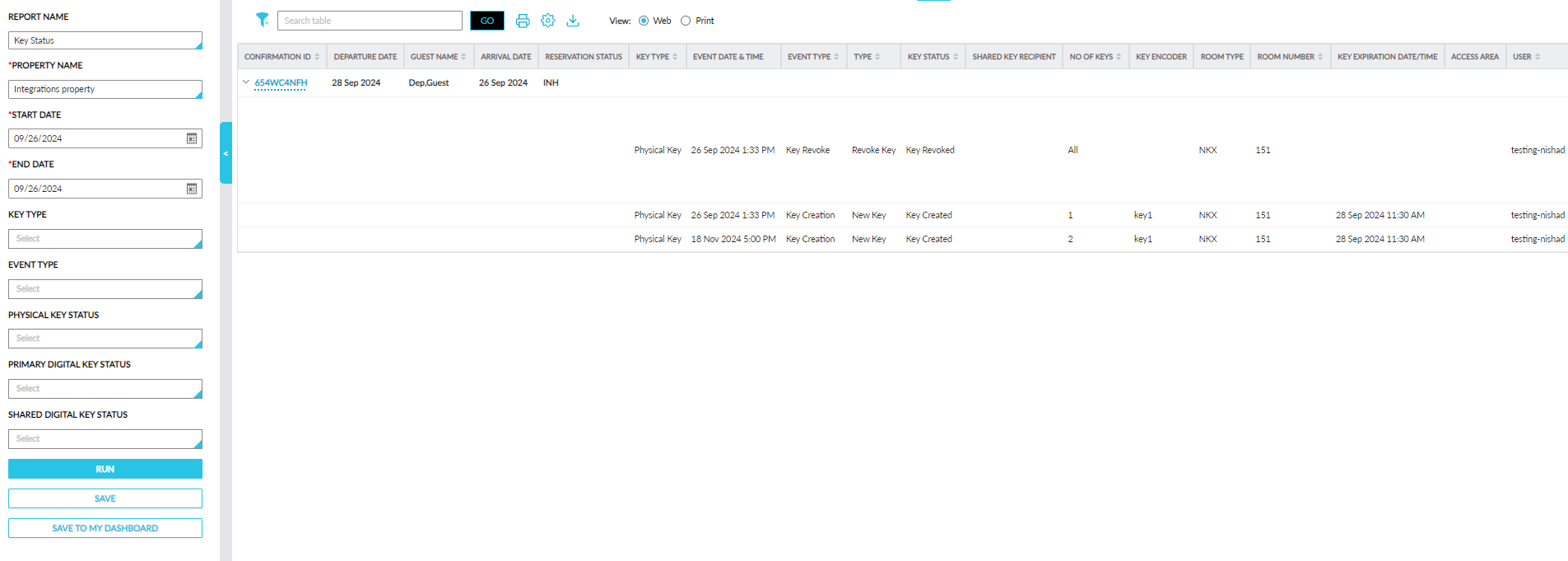
Key Status Report (Dynamic)
A new Dynamic report, Key Status, has been added to the Guests/Reservations section of the Reporting screen (Reports ➜ Dynamic Reports ➜ Guests/Reservations) that allows users to track the status of the physical and digital keys generated for a reservation. This report can be generated for reservations in the following statuses for a maximum duration of 30 days:
-
Arriving
-
In-House
-
Departing
-
Departed
The following report generation parameters are available for this report:
|
Field |
Description |
|---|---|
|
Report Name |
Key Status |
|
Property |
This is a mandatory single-select drop-down list that displays the current property by default. All properties available under the tenant are displayed in the drop-down list. Users can generate the report for the selected property. |
|
Start Date |
This is a mandatory field that displays the current property date by default. Users can select a date that is a maximum of 365 days in the past. |
|
End Date |
This is a mandatory field that displays the current property date by default. Users can select a date that is a maximum of 365 days in the past and 30 days from the start date. |
|
Physical Key Status |
This is an optional multi-select drop-down list that allows users to select from the following physical key statuses to be included in the report.
|
|
Primary Digital Key Status |
This is an optional multi-select drop-down list that allows users to select from the following primary digital key statuses to be included in the report.
|
|
Shared Digital Key Status |
This is an optional multi-select drop-down list that allows users to select from the following shared digital key statuses to be included in the report.
|
|
Key Type |
This is an optional multi-select drop-down list that allows users to select from the following key types to be included in the report.
|
|
Event Type |
This is an optional multi-select drop-down list that allows users to select from the following event types to be included in the report.
|